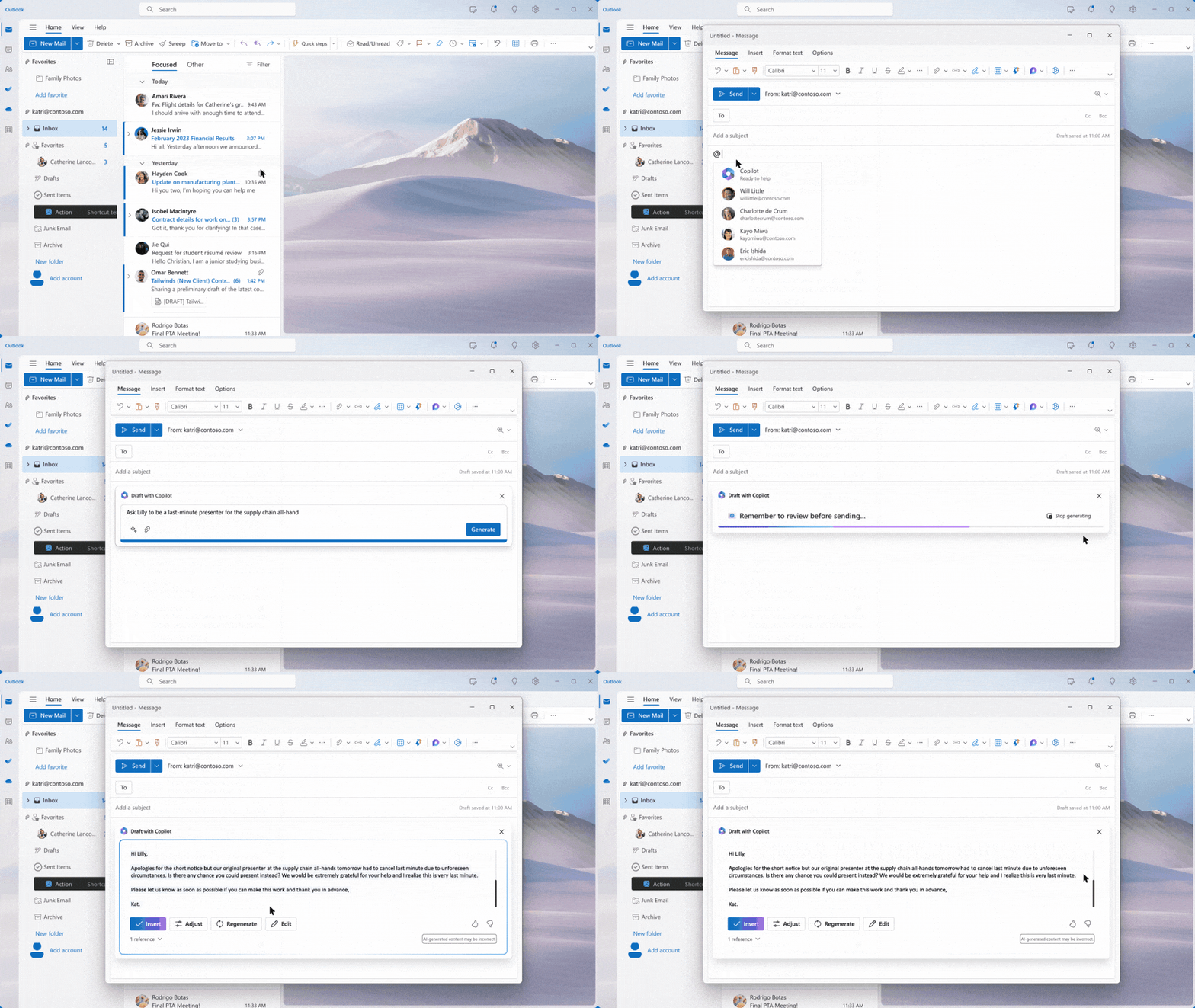
Copilot is a groundbreaking artificial intelligence product that assists users in their daily work within Microsoft 365 applications. As a smart tool, Copilot quickly and efficiently transforms ideas into content based on user commands, automates routine tasks, and enhances productivity. Discover the power of Copilot and experience how it simplifies complex tasks while unlocking new creative possibilities in the world of work!
The use of artificial intelligence in Copilot revolutionizes the Microsoft 365 user experience by automating routine tasks and providing intelligent suggestions. Through the integration of new technological solutions, Copilot enables users to complete complex workflows faster and more efficiently.
Efficiency
Copilot increases efficiency by automating repetitive tasks and providing intelligent suggestions, allowing users to complete their work more easily. Additionally, with AI-generated content and data visualizations, it reduces the time spent processing information, enabling employees to focus on more important tasks.
Creativity
Copilot can generate new content, designs, and unique solutions that help users bring their ideas to life. It also supports brainstorming sessions and contributes to solving and assembling complex tasks.
Integration
Copilot’s seamless integration with Microsoft 365 applications allows users to work across multiple tools and programs without interrupting their workflow. Users can easily switch between emails, documents, and data visualizations — all within a single central platform.
Frequently asked questions
What are the most common use cases for Copilot?
The most common use cases for Copilot include content generation such as creating documents, emails, and presentations, as well as producing data visualizations that help users interpret information. In addition, Copilot supports brainstorming and team collaboration.
What types of tasks can be automated with Copilot?
Copilot can automate routine tasks such as writing emails, editing documents, and creating visual elements like charts. It can also provide intelligent suggestions for content generation and project management, reducing the user’s workload.
Who is Copilot ideal for?
Copilot is useful for anyone using Microsoft 365 applications, including companies, professionals, and creative workers. It is especially beneficial for those who regularly perform repetitive tasks.
Is Copilot useful in any industry?
Yes, Copilot can be valuable in any industry, as AI-powered automation and creative assistance improve employee performance. Whether in finance, marketing, or healthcare, Copilot enables users to complete their tasks more easily and quickly.
Are my organization’s data secure when using Copilot?
Yes, your organization’s data is secure when using Copilot, as Microsoft employs strong security tools, including data protection and encryption. The system is continuously updated with the latest security features to safeguard sensitive information.
Can Copilot integrate with my previously used applications?
Copilot integration is primarily limited to Microsoft 365 applications. Therefore, if your previously used apps are outside the Microsoft ecosystem, Copilot will not be available. However, if they are part of Microsoft 365, Copilot will work seamlessly with them.
Our YouTube channel
On our channel, you can watch demo-filled presentations and videos covering all the services we offer. (The Videos are all in Hungarian)
A website cookie-kat használ a szolgáltatások optimalizálásához. Kérjük, a lenti gombok valamelyikével válassza ki az ön számára megfelelőt.
Funkcionális
Always active
The technical storage or access is strictly necessary for the legitimate purpose of enabling the use of a specific service explicitly requested by the subscriber or user, or for the sole purpose of carrying out the transmission of a communication over an electronic communications network.
Preferences
The technical storage or access is necessary for the legitimate purpose of storing preferences that are not requested by the subscriber or user.
Statisztikai
The technical storage or access that is used exclusively for statistical purposes.The technical storage or access that is used exclusively for anonymous statistical purposes. Without a subpoena, voluntary compliance on the part of your Internet Service Provider, or additional records from a third party, information stored or retrieved for this purpose alone cannot usually be used to identify you.
Marketing
The technical storage or access is required to create user profiles to send advertising, or to track the user on a website or across several websites for similar marketing purposes.